

What is Github and Why should you use it?
Version Control Basics
Version control is a system that tracks and manages changes to files, especially code, over time, allowing developers to collaborate efficiently, revert to previous versions, and maintain a history of changes.
Key Concepts
Tracking Changes
Reverting to Previous Versions
Collaboration
Repositories
Commits
Branching
Merging
Now let us understand what do each of these mean
Tracking Changes
Reverting to Previous Versions
Collaboration
Repositories
Commits
Branching
Merging
Benefits of Using Version Control
Improved Collaboration
Developers can work together on the same project without fear of overwriting each other's work.
Enhanced Code Integrity
VCS helps maintain a clean and organized codebase by tracking changes and allowing for easy rollback.
Increased Productivity
Developers can work faster and more efficiently by leveraging the tools and features of VCS.
Easier Bug Fixing
Developers can easily identify and fix bugs by reverting to previous versions of the code.
Better Documentation
VCS provides a comprehensive history of changes, making it easier to understand the evolution of a project.
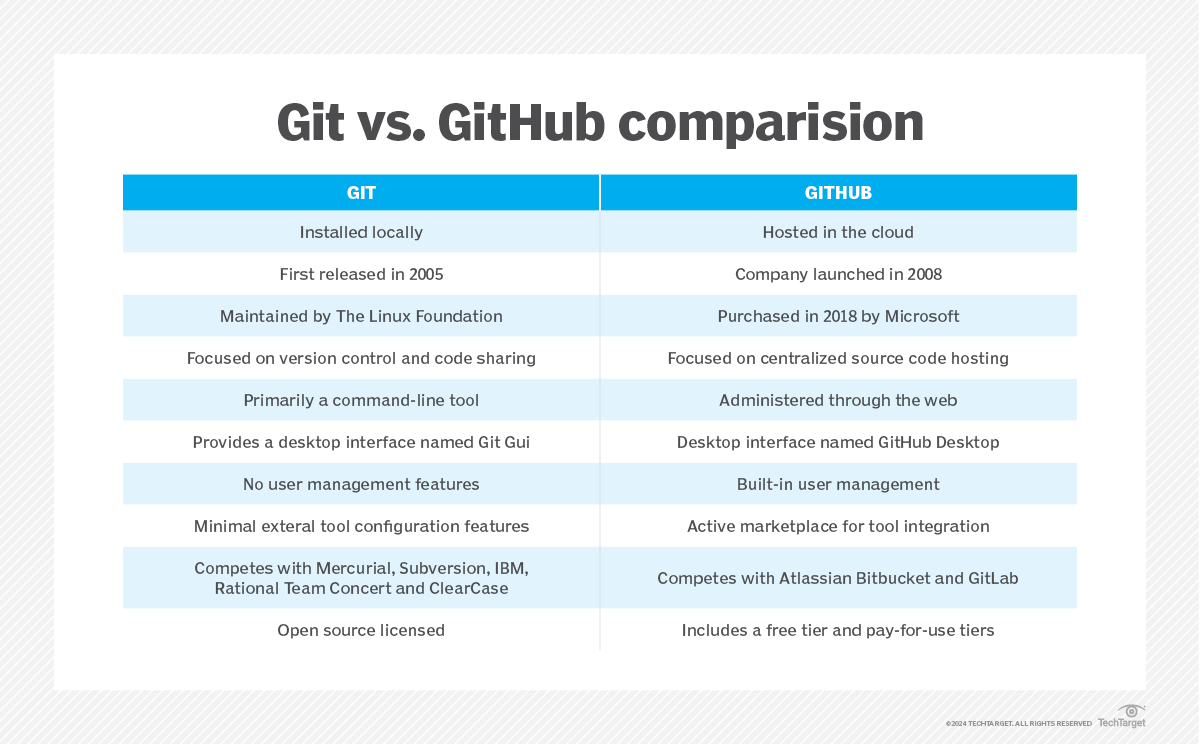
Difference between Git and GitHub
The key difference between Git and GitHub is that Git is a free, open source version control tool that developers install locally on their personal computers, while GitHub is a pay-for-use online service built to run Git in the cloud.
Git is a piece of software. GitHub is an online SaaS service. Yet despite this distinction, Git and GitHub are not competitive offerings. Instead, they work together and complement each other.
Why developers & companies use GitHub?
Developers and companies use GitHub for its robust version control (Git), seamless collaboration features, and ability to host and manage code repositories, fostering a collaborative environment for software development and open-source projects.
